Events · Lead capture
Event lead capture — in person or online — with the CRM built in.
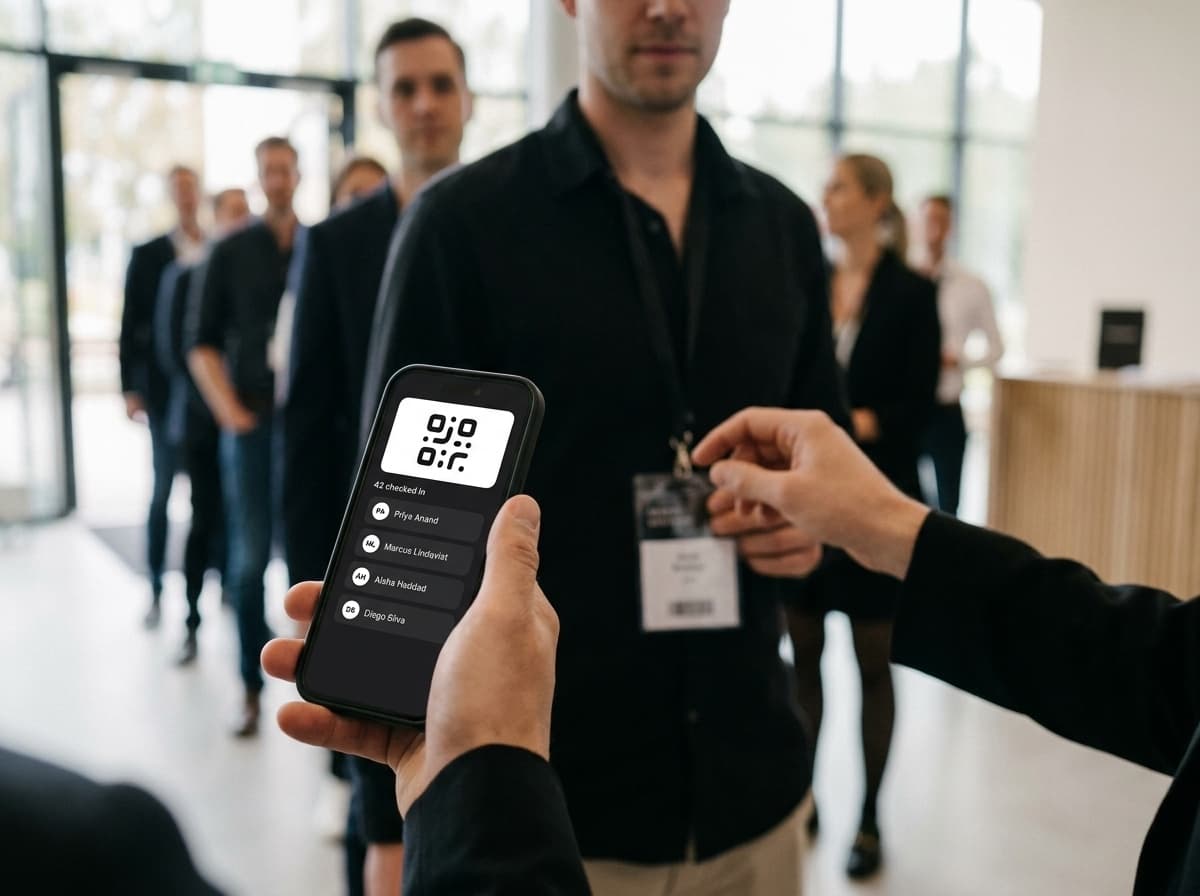
Scan badges and cards like Popl or Blinq — then keep working the lead in the same product. No export, no second tool: the enrichment, follow-up and pipeline are already here.
Online events count too
Webinars and live streams feed the exact same lead funnel as the show floor. Capture-only badge tools never leave the room.
The CRM is included
Competitors end at “syncs to your CRM.” There is no second CRM here — this is the CRM. The lead lands where the work happens.
The after-capture engine is native
Auto-enrichment, automatic follow-up, qualifying questions, workflows and deals — built in, not bolted on with a Zapier tax.
Capture every lead, however they show up
The show floor and the webinar room feed one funnel. Pick a lane — the capture methods are built for both.
Scan badges & paper cards with AI
Point the camera at a conference badge or a stack of business cards. Claude Vision reads each one with 3-shot consensus, and batch mode clears a whole fishbowl in one pass.
QR & NFC in one tap
Tap phones or scan a QR to pull a full contact in instantly — no typing, no misspelled emails. Manual add is there for the one person without a card.
Kiosk mode on the booth
Leave a tablet on the table running an unattended capture page. Visitors add themselves via QR or URL while your team keeps talking.
Works when the venue Wi-Fi doesn’t
Capture offline all day. Everything queues on device — mobile and web — and syncs the moment you get signal. Nothing is lost on the show floor.
Event mode tags everything
Flip on event mode and every capture is auto-tagged to the event, stamped with a venue geofence tag, and counted on a live capture counter — with an iOS Live Activity on the lock screen.
Voice memos become AI notes
Talk between conversations. Voice memos turn into clean AI notes on the contact with a suggested next step, so context survives past the badge scan.
Every scan is a contact the second it lands — not a photo to sort out later.
This is where capture-only tools hand you a CSV
Enrich, qualify, follow up, close — one continuous engine that runs the second the lead lands. No export step. Nothing to wire up.
Step 1 · Enrich
Auto-enrich on capture
Company, role and socials fill in the moment a lead lands — on platform credits or your own key (BYOK). A scanned name becomes a real profile.
Step 2 · Qualify
Ask the right one to three questions
Admin-preset qualifying questions and notes at capture auto-tag each lead by buying stage, so hot and cold sort themselves before you leave the booth.
Step 3 · Follow up
Automatic follow-up email
Every captured lead gets an AI-personalisable follow-up — suppression- and unsubscribe-safe — sent while you are still shaking the next hand.
Step 4 · Close
Straight into pipeline & deals
Triage keep-or-discard, drop leads into pipelines and deals, and fire workflows — no export, no import, no lag between the event and the follow-through.
A booth full of reps, one shared pile of leads
Everyone scans into the same event. Leads route round-robin so no one double-works a contact, and every host gets their own recap when the doors close.
Shared capture
The whole team captures into one live event feed — no reconciling spreadsheets at the end of the day.
Round-robin lead routing
New leads distribute evenly across reps automatically, so follow-up ownership is never a fight.
Per-host recap
Each host sees who they captured and what happened next — with a per-host breakdown across the whole event.
The difference is what happens next
A badge scanner and a full lead engine start the same way. They end nowhere near each other.
Capture-only tools
- Scan the badge, then stop
- In-person events only
- Ends at “syncs to your CRM”
- You pay for a separate CRM
- Follow-up is your problem
- Enrichment is another vendor
Titan Events
- Scan the badge, then work the lead
- In person and online — same funnel
- This is the CRM
- One product, no second seat
- Follow-up sends itself
- Enrichment fires on capture
Export anywhere — but you won’t need another CRM.
Push captured leads to your API, Zapier or Make, or sync to Google Contacts. Most teams never do — the follow-up, the pipeline and the deal already live right here.